Business Dashboard
SHIPMENT TRACKING DASHBOARD
1. PROJECT OVERVIEW
The Shipment Tracking Dashboard provides end-to-end visibility into logistics operations across shipments, trucks, and delivery routes. Designed for operations managers and logistics coordinators, this multi-view dashboard answers critical questions: Where are shipments right now? Which trucks are performing efficiently? What are our on-time delivery rates? By consolidating shipment data, truck fleet information, and route tracking into one unified interface, the dashboard eliminates the need to check multiple systems or spreadsheets for operational insights.
2. DATA & REQUIREMENTS
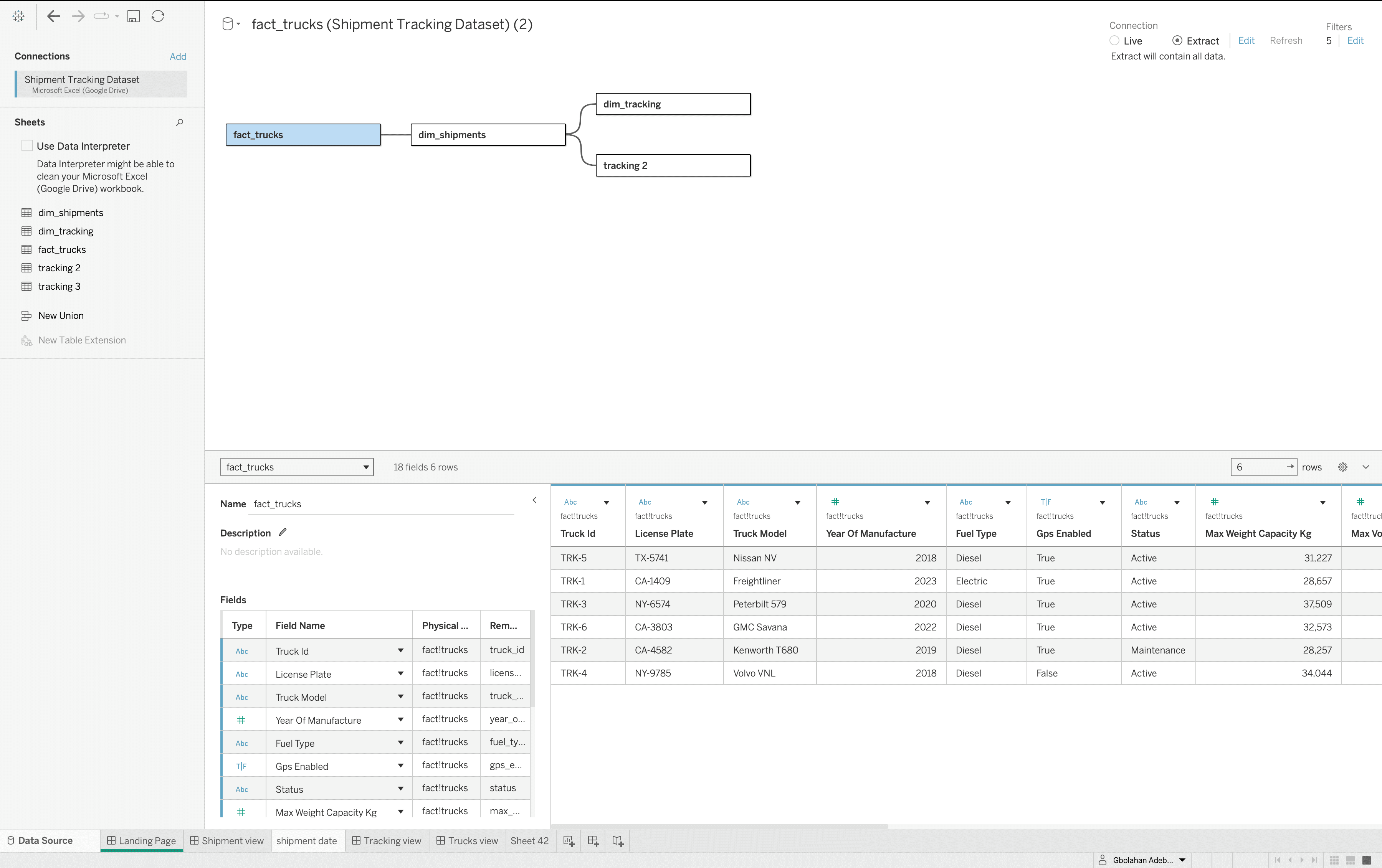
The system tracks comprehensive logistics data, including shipment records with pickup dates, destinations, customer information, and delivery status. Truck fleet data covers vehicle specifications, GPS locations, fuel types, capacity, and total trips completed. Geographic tracking monitors real-time routes across multiple states with delivery progress indicators. The primary requirement was building a centralized operations command center where teams could monitor 100% delivery rates, track average delivery times, analyze stop efficiency, and identify bottlenecks across the entire shipment lifecycle without manual reporting.
3. INTERACTIVE FEATURES
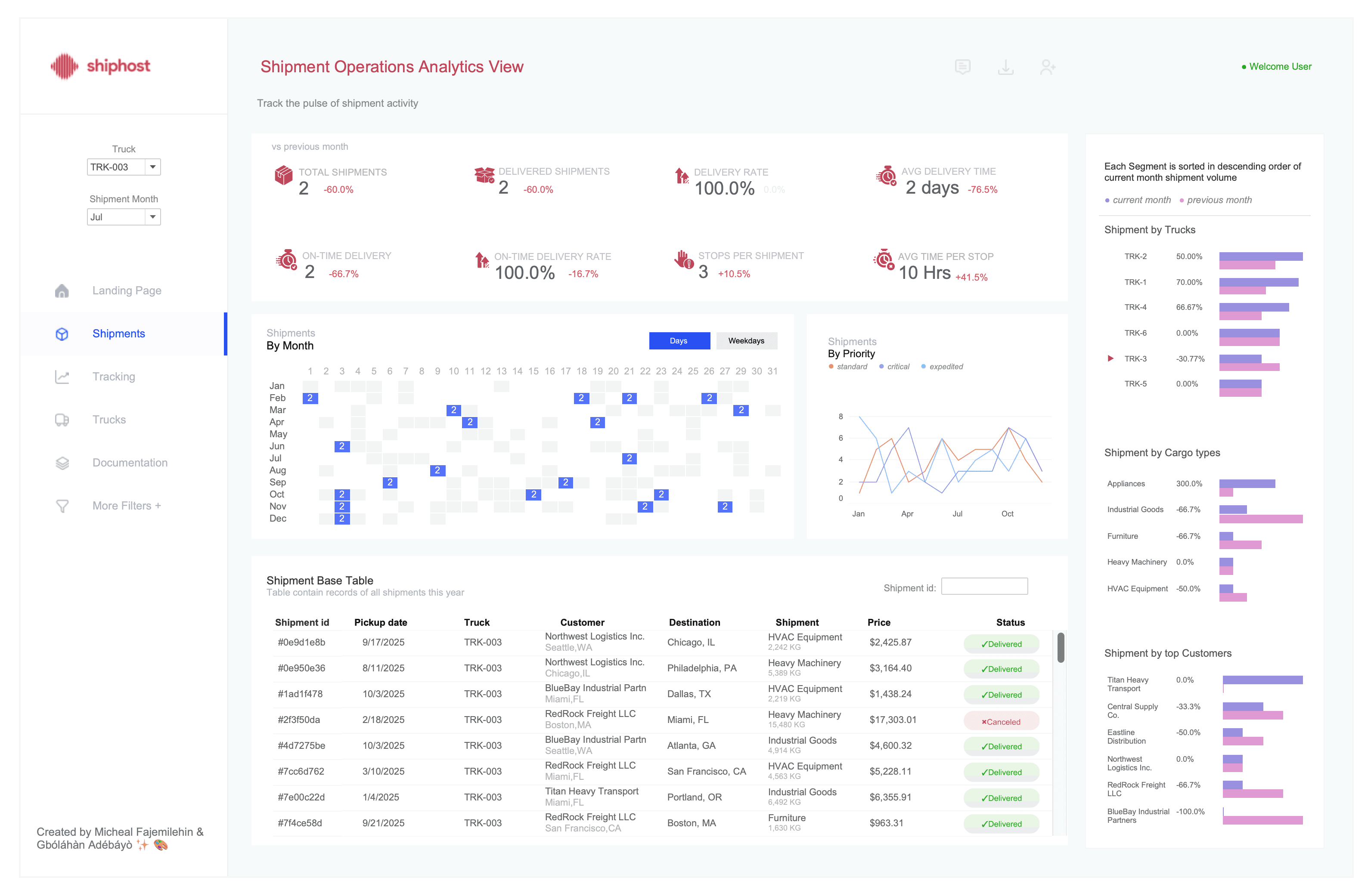
The dashboard features four distinct views accessible through intuitive navigation. The Landing Page provides high-level metrics with 858 total shipments, 382 completed deliveries, and 6 active trucks at a glance. The Shipment Operations View displays KPI cards tracking delivery rates, average delivery times, and stops per shipment alongside calendar heatmaps showing monthly patterns and priority-based trend lines. The Tracking View offers an interactive map with real-time shipment locations, route visualization, and detailed package information cards showing weight, price, and delivery status. The Truck Operation View presents each vehicle with journey timelines, delivery schedules, GPS status, fuel type, capacity metrics, and complete route maps. Users can filter by truck, select specific shipments, and drill down into individual delivery details through simple clicks.

4. TECHNICAL EXECUTION & OUTCOME
Built in Tableau Desktop with integrated mapping capabilities using Mapbox, the dashboard leverages parameter actions for view switching, spatial calculations for route visualization, and dynamic filtering across all connected data tables. Custom icons and status indicators provide instant visual feedback on delivery states (delivered, in transit, cancelled). The color-coded system uses red for delays, green for completed deliveries, and yellow for in-transit shipments, ensuring immediate pattern recognition. The result is a comprehensive logistics control center that enables operations teams to monitor fleet performance, track 100% delivery completion rates, identify trucks with late deliveries, and optimize routes based on historical performance data. This real-time visibility eliminates communication gaps between the warehouse, drivers, and customers while reducing manual status update requests by providing self-service shipment tracking for all stakeholders.
More Projects

Business Dashboard
SHIPMENT TRACKING DASHBOARD
1. PROJECT OVERVIEW
The Shipment Tracking Dashboard provides end-to-end visibility into logistics operations across shipments, trucks, and delivery routes. Designed for operations managers and logistics coordinators, this multi-view dashboard answers critical questions: Where are shipments right now? Which trucks are performing efficiently? What are our on-time delivery rates? By consolidating shipment data, truck fleet information, and route tracking into one unified interface, the dashboard eliminates the need to check multiple systems or spreadsheets for operational insights.
2. DATA & REQUIREMENTS
The system tracks comprehensive logistics data, including shipment records with pickup dates, destinations, customer information, and delivery status. Truck fleet data covers vehicle specifications, GPS locations, fuel types, capacity, and total trips completed. Geographic tracking monitors real-time routes across multiple states with delivery progress indicators. The primary requirement was building a centralized operations command center where teams could monitor 100% delivery rates, track average delivery times, analyze stop efficiency, and identify bottlenecks across the entire shipment lifecycle without manual reporting.
3. INTERACTIVE FEATURES
The dashboard features four distinct views accessible through intuitive navigation. The Landing Page provides high-level metrics with 858 total shipments, 382 completed deliveries, and 6 active trucks at a glance. The Shipment Operations View displays KPI cards tracking delivery rates, average delivery times, and stops per shipment alongside calendar heatmaps showing monthly patterns and priority-based trend lines. The Tracking View offers an interactive map with real-time shipment locations, route visualization, and detailed package information cards showing weight, price, and delivery status. The Truck Operation View presents each vehicle with journey timelines, delivery schedules, GPS status, fuel type, capacity metrics, and complete route maps. Users can filter by truck, select specific shipments, and drill down into individual delivery details through simple clicks.
4. TECHNICAL EXECUTION & OUTCOME
Built in Tableau Desktop with integrated mapping capabilities using Mapbox, the dashboard leverages parameter actions for view switching, spatial calculations for route visualization, and dynamic filtering across all connected data tables. Custom icons and status indicators provide instant visual feedback on delivery states (delivered, in transit, cancelled). The color-coded system uses red for delays, green for completed deliveries, and yellow for in-transit shipments, ensuring immediate pattern recognition. The result is a comprehensive logistics control center that enables operations teams to monitor fleet performance, track 100% delivery completion rates, identify trucks with late deliveries, and optimize routes based on historical performance data. This real-time visibility eliminates communication gaps between the warehouse, drivers, and customers while reducing manual status update requests by providing self-service shipment tracking for all stakeholders.
More Projects
Business Dashboard
SHIPMENT TRACKING DASHBOARD
1. PROJECT OVERVIEW
The Shipment Tracking Dashboard provides end-to-end visibility into logistics operations across shipments, trucks, and delivery routes. Designed for operations managers and logistics coordinators, this multi-view dashboard answers critical questions: Where are shipments right now? Which trucks are performing efficiently? What are our on-time delivery rates? By consolidating shipment data, truck fleet information, and route tracking into one unified interface, the dashboard eliminates the need to check multiple systems or spreadsheets for operational insights.
2. DATA & REQUIREMENTS
The system tracks comprehensive logistics data, including shipment records with pickup dates, destinations, customer information, and delivery status. Truck fleet data covers vehicle specifications, GPS locations, fuel types, capacity, and total trips completed. Geographic tracking monitors real-time routes across multiple states with delivery progress indicators. The primary requirement was building a centralized operations command center where teams could monitor 100% delivery rates, track average delivery times, analyze stop efficiency, and identify bottlenecks across the entire shipment lifecycle without manual reporting.
3. INTERACTIVE FEATURES
The dashboard features four distinct views accessible through intuitive navigation. The Landing Page provides high-level metrics with 858 total shipments, 382 completed deliveries, and 6 active trucks at a glance. The Shipment Operations View displays KPI cards tracking delivery rates, average delivery times, and stops per shipment alongside calendar heatmaps showing monthly patterns and priority-based trend lines. The Tracking View offers an interactive map with real-time shipment locations, route visualization, and detailed package information cards showing weight, price, and delivery status. The Truck Operation View presents each vehicle with journey timelines, delivery schedules, GPS status, fuel type, capacity metrics, and complete route maps. Users can filter by truck, select specific shipments, and drill down into individual delivery details through simple clicks.
4. TECHNICAL EXECUTION & OUTCOME
Built in Tableau Desktop with integrated mapping capabilities using Mapbox, the dashboard leverages parameter actions for view switching, spatial calculations for route visualization, and dynamic filtering across all connected data tables. Custom icons and status indicators provide instant visual feedback on delivery states (delivered, in transit, cancelled). The color-coded system uses red for delays, green for completed deliveries, and yellow for in-transit shipments, ensuring immediate pattern recognition. The result is a comprehensive logistics control center that enables operations teams to monitor fleet performance, track 100% delivery completion rates, identify trucks with late deliveries, and optimize routes based on historical performance data. This real-time visibility eliminates communication gaps between the warehouse, drivers, and customers while reducing manual status update requests by providing self-service shipment tracking for all stakeholders.